Now playing
Play, pause, skip and seek in Music or Spotify. Follow synced lyrics and fine-tune their timing for each track. Adjust system volume in the same panel.
Notchion puts playback, a focus timer, volume, battery alerts and quick tools at the top of your Mac. Open it with a click or a hover; it gets out of the way in full screen.
No notch? The same island floats as a pill on your external display, iMac or Mac mini.
Click a tab. Start a timer. Save a thought.
The island is yours to explore.
Click outside to collapse · ⌘K for quick actions
Preview data stays in this browser tab. AI and music controls are demonstrations; the Mac app connects to your real tools.
Right where your attention already is.
The panel below is the running macOS app: playback, focus, system volume and the controls along the top edge.
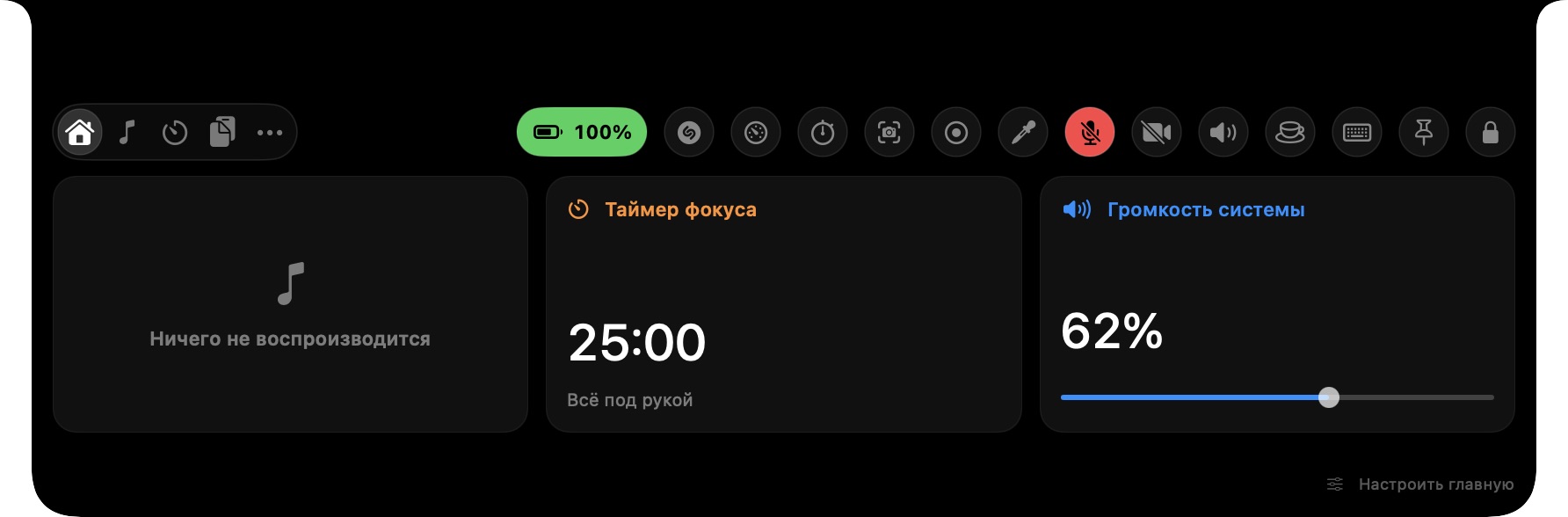
An alert unfolds from the island. Your active timer or music keeps its width. Useful actions stay close, with space to breathe.
No extra close buttons. Swipe up to dismiss.
Try the live demoReal walking animation, beside your focus timer.
A closer look at the island. Choose a preview to explore.
See what is playing, change volume, start a timer or catch a file without hunting for another window.
Play, pause, skip and seek in Music or Spotify. Follow synced lyrics and fine-tune their timing for each track. Adjust system volume in the same panel.
Pick a duration, press start and get into your work. Your countdown stays visible beside the camera.
Find something you copied. Pin what matters. Keep your text history on your Mac.
Drop a file onto the notch. Drag it into another app when you need it, or reveal it in Finder.
Capture a thought before it disappears. Your notes are saved locally and always within reach.
Connect OpenAI, OpenRouter, Ollama or a compatible provider. Summarize, rewrite and translate.
Work out expressions, percentages and parentheses. Copy the result in one click.
Time a small task with a precise, simple counter. Start, pause and reset from the island.
Pick any color on your screen and copy its HEX value with the native macOS color sampler.
Open the familiar macOS screenshot tools from your island. Capture a region, window or screen.
Changing your Mac's output volume brings a compact level meter into the notch. It disappears when you are done.
See an island alert when another app starts using a camera. A glance tells you when it is active.
Keep the display awake while you read, present or work. Turn it off with the same small button.
Press Control–Option–K anywhere on your Mac. Search and jump straight to the tool you need.
From the shape of your island to the tools inside it.
Every detail has its place.
Make the island feel right at home.
Expanded panelThese controls update the interactive island above.
Choose your provider, paste your API key and save.
A helping hand is always just a click away.
Use a cloud service or a local Ollama model.
Your key is saved in macOS Keychain.
Only the text you send goes to your provider.
Provider usage may be billed separately. Local models need a running local server.
A clear timer. Fewer reasons to switch windows.
The next track, without leaving your next idea.
Files, quick calculations and a little AI help.
Catch a thought. Find a clip. Keep moving.
Automatic language selection, or choose your own.
Translations are built into the app and work offline.
Yes. Notchion can float as a pill on an iMac, Mac mini or an external display. On a MacBook with a notch, it reads the display geometry and attaches to the top edge.
Download the DMG, open it and drag Notchion into Applications. This developer preview has a consistent local signature, but is not Apple Developer ID signed or notarized, so macOS may ask you to approve the launch.
OpenAI, OpenRouter, Ollama and providers with an OpenAI-compatible chat API. Choose a provider in Settings, add your key and save. Advanced settings let you change the model and API address.
On your Mac, in Notchion's Application Support folder. Clipboard history is off until you enable it. AI receives only the text you explicitly send.
The current build is distributed as a DMG. App Store and Homebrew releases have not been published yet.
Music and Spotify controls, focus timer, clipboard history, file shelf, notes, AI chat, calculator, stopwatch, color picker, screenshot shortcut and keep-awake mode. It requires macOS 13 or later.

Give the top of your Mac something useful to do.
Download for Macv0.4.1 · Developer preview · macOS 13+